Gated content
Search gated content
Requires Monocle "Professional" plan.
What gated content search covers
Monocle can use a Squarespace customer account to crawl content behind an account login. Squarespace supports four kinds of gated content:
- Member sites, which contain protected pages.
- Courses, which contain individual lessons.
- Blogs, including podcasts published as blog posts.
- Video libraries, with overview and video details pages.
These can have free, fixed-price, or subscription access. A package or bundle combines content in a pricing plan; it is not a separate content type. See Squarespace's pricing plan guide.
Monocle searches page text and supported documents. It does not automatically transcribe video or audio. Store download purchases, third-party paywalls, and shared page passwords are separate from this customer-account mechanism.
The same indexing account must have access to all the protected content you want to index. Give it access to every required course, package, member site, blog, video library, and membership tier. A successful login or access to one package does not grant access to the others.
Gated content search requires a Professional plan. On sites connected through Squarespace OAuth, Monocle can distinguish logged-in visitors from logged-out visitors. With Code Injection only, all visitors can see results and any enabled excerpts from indexed gated content.
Step 1: Give Monocle indexing credentials
Use a dedicated Squarespace customer account, not your website administrator login. Follow Create a user for gated content search to create the account, join every required plan, and verify its access.
- Open Gated content in the Monocle interface.
- Enter the dedicated account's email address and password.
- Select Set credentials.
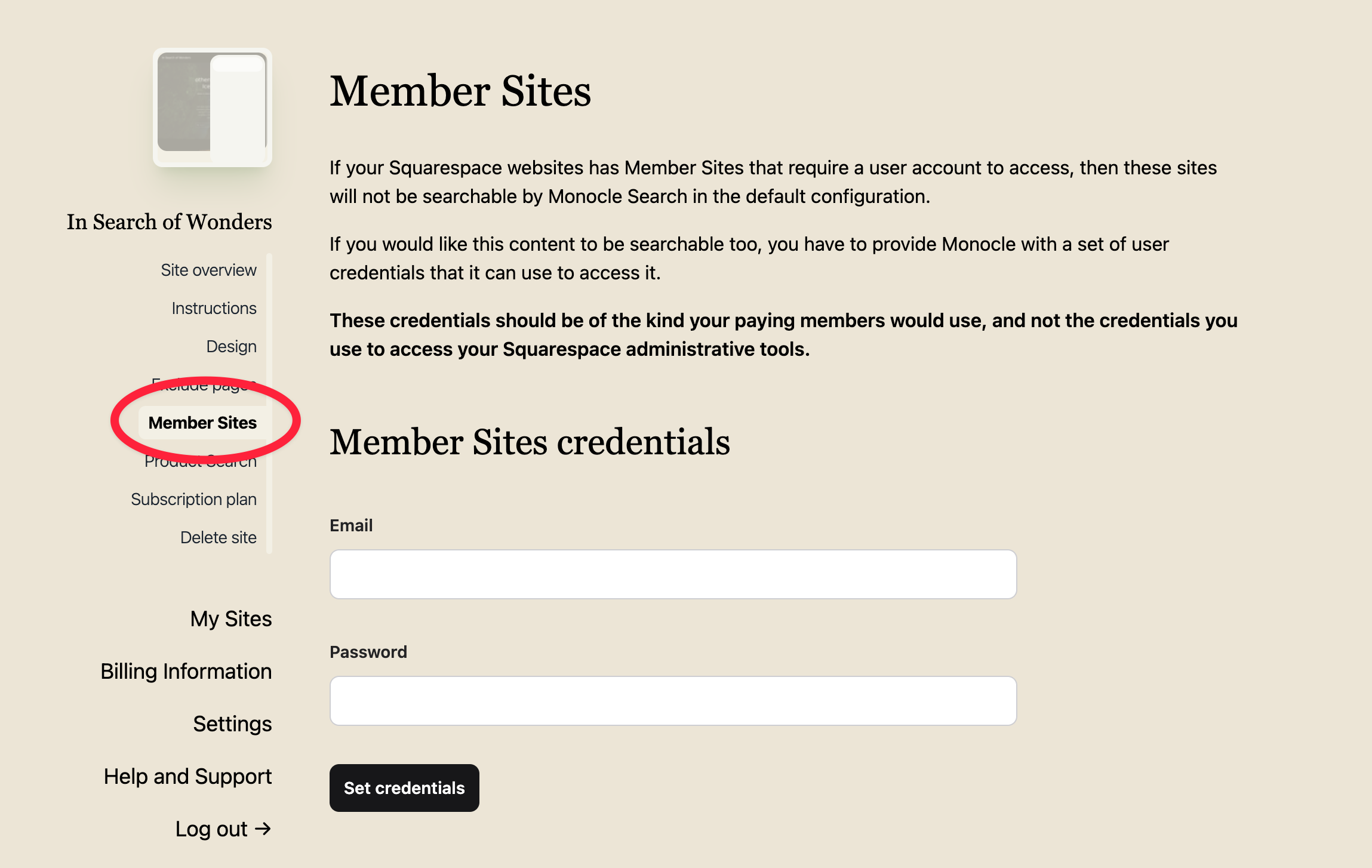
Monocle signs in with the credentials to validate them. After it saves the credentials, it starts a crawl. The crawl may take time on a large site.
Login validation does not check your intended content coverage. Before saving, use the same account to open protected pages in every required course, package, and membership tier. Public overviews and preview lessons do not prove access.
Select Remove credentials to remove them. Monocle then starts a crawl that removes gated content from the search index.
Step 2: Choose who sees gated content
On sites connected through Squarespace OAuth, Monocle detects whether a visitor is logged in. You do not need to install another component.
Logged-in visitors can see indexed gated content in their search results. These controls do not check which course or pricing plan each visitor has bought.
Do not use Monocle's logged-in setting as a per-course or per-plan permission system. Search results can reveal titles and excerpts from the indexing account's content. Squarespace still controls access when a visitor opens the original page.
For logged-out visitors, choose an option under Logged-out user behaviour:
- Yes, show protected content (default): Gated content appears in results for all visitors. Results can include an excerpt when the design settings allow it.
- No, hide protected content: Gated content appears only for visitors verified as logged in.
Step 3: Label protected results
Gated content results can include a label. The label tells visitors why they may not be able to open the page.
On the Gated content page, you can:
- change the label text, for example, Members only
- show or hide the label

Whether results also show a text excerpt is controlled by your design settings, not by the label.
Gated content in AI answers
By default, AI answers do not use protected content. The AI uses only public pages and tells visitors when it excluded protected pages.
To let AI answers use gated content for logged-in visitors, enable Can AI answers include gated content? on the AI Answers page.
- Logged-in visitors can get answers based on indexed gated content. This is not filtered by the course or plan that each visitor bought.
- Logged-out visitors get answers based on public content only.
This setting is separate from the search result setting. You can show protected results while excluding that content from AI answers.
Protected documents and PDFs
If your plan includes document search, Monocle can also index supported documents linked from protected pages. Logged-in visitors can open indexed protected documents from search results. For logged-out visitors, Monocle either shows a redacted preview or omits the document. These controls do not add per-course or per-plan permissions.
Combining gated content with search lenses
Search lenses also apply to gated content.
Search one area: Create a lens for the required paths, such as /members* or /course*. Limit its results to those paths.
Exclude an area from public search: Exclude its paths from the Default lens. A lens narrows results; it does not grant access or verify a visitor's course purchases.
Troubleshooting
Some protected content is missing. Sign into the website with the exact account saved in Monocle. Open a protected item in every required course, package, member site, blog, and video library. Join any missing plans, then select Crawl again now on the site overview.
Set credentials fails. Check that you entered customer credentials, not a Squarespace administrator login. Monocle could not sign in with those credentials.
A setting changed, but the results did not. Wait for the automatic crawl to finish, then check again.
A logged-in member sees the logged-out experience. Check that the site uses the Squarespace OAuth connection and that the connection has the member profile permission. Reconnect the site if necessary.