Collections
Build a custom interface around your Collection
Start with the Card designer. Use CSS when you need a different presentation. Use the public JavaScript events when another part of the page must follow the Collection's state or results.
You do not need to scrape card text, intercept network requests, or maintain a second search client. The embed remains responsible for content access, filtering, sorting, and result loading.
Style the semantic HTML
Choose Unstyled for a clean visual starting point. It retains structure and accessibility behaviour in the page's ordinary DOM. Designed grids keep their existing geometry and visual surface, so small overrides are safer than a complete CSS reset.
Every published Collection has a root with both data-collection-root and data-collection-id. Copy Instructions for your coding agent from Card designer to get selectors for the actual Collection and its current configuration.
Useful hooks include:
| Hook | Use |
|---|---|
[data-collection-part="results"] | The rendered result layout. |
article[data-collection-part="card"] | One item, including its Pin, Bump, and filter-match classes. |
.collection-card-body | Unstyled card content. |
.collection-designed-card | The visual surface inside a designed card. |
[data-collection-field="title"], [data-collection-field="context"], [data-collection-field="image"] | Selected field blocks. |
.collection-token-title, .collection-token-excerpt, .collection-token-price | Individual interpolated values inside a text block. |
[data-collection-filter] | A filter wrapper identified by its saved group ID. |
[data-collection-filter-kind="categories"] | A built-in filter kind, independent of its translated caption. |
[data-collection-part="group-label"] | The visible group caption, separate from counts and values. |
.collection-pagination-link | Linked page and Load more controls. |
A block can contain several values. A date inside a title block does not create a separate Date block. Missing data can omit fields. Do not assume that every article has identical children or that every card surface is a link: cards with author actions use separate navigation and interactive controls.
Scope every rule
For a small example, put one Collection embed inside a wrapper with id="journal-embed". Add <div id="journal-embed"> before the complete copied embed snippet and </div> after it. Do this before the embed runs, not by moving a mounted Collection.
With Unstyled cards, this CSS changes only that embedded listing:
#journal-embed [data-collection-root] [data-collection-field="title"] {
  font-family: Georgia, serif;
  font-size: 1.5rem;
  line-height: 1.2;
}

#journal-embed [data-collection-root] article.collection-pinned {
  border: 2px solid currentColor;
}

#journal-embed [data-collection-root] article.collection-boosted {
  background: #f3f0e8;
}
For a designed card, target its .collection-designed-card surface when changing the background or border. Use the editor's copied guidance for overriding saved visual styles.
Configured custom, Categories, and Author options also add collection-filter-{filter-name}-{option-label} classes to matching articles. Inspect the actual class rather than guessing how punctuation is encoded. A card can match several options and category ancestors. These classes describe membership, not the visitor's active selection. Date and numeric Price ranges do not create option classes.
Preserve accessibility
Keep native links, buttons, input labels, hidden states, disabled states, and visible focus indicators. Pair hover styling with keyboard focus. Do not clip outlines or replace the DOM order with a visually unrelated order.
CSS-generated text is not an accessible way to rename a control. Prefer labels in the editor. If a script changes a caption, it must also update the related accessible label and tooltip without losing counts, values, or aria-labelledby relationships.
Public JavaScript events
Monocle uses these case-sensitive event names:
| Event | Direction | Meaning |
|---|---|---|
monocle:collection:change | Output | Initial state, a canonical input-state change, or a settings change. |
monocle:collection:results | Output | A result set has been accepted, or previously displayed results have been cleared. |
monocle:collection:status | Output | The built-in loading, progress, or error state changed. |
monocle:collection:update | Input | Request a partial visitor-state update on one Collection root. |
Output events originate on the Collection root, bubble, and cross shadow boundaries. A listener on document can receive them, but must check which Collection sent them. Use event.composedPath() to find the root rather than assuming event.target is always that element.
Register listeners before the Collection embed runs. Initial state and initial snapshot results can arrive immediately. Events are not a replayable history for listeners added afterwards. Test this API on a published embed; editor previews do not emit the public events.
Common detail
Every output event has a detached, JSON-safe event.detail object:
| Field | Contents |
|---|---|
version | 1. Check it before interpreting the payload. |
siteId, collectionId | The source site and Collection identifiers. |
originPath | The embedding path used by this Collection. |
state | Query, page, sort, selected group IDs, and active product or date values. |
config | The effective public Collection settings, including filter definitions, labels, design settings, localisation, page size, and pagination mode. |
state.groups maps each group ID to an array of selected option IDs. config.groups contains group IDs, names, optional kinds, and options with IDs and labels. Category options can have parentId. Use IDs to submit selections; labels can change or be translated.
State includes query, page, sort, groups, onlyInStock, onlyOnSale, priceMin, and priceMax. Prices are decimal strings, with optional priceCurrency. Date state can include dateRange, dateFrom, and dateTo. The custom date bounds use YYYY-MM-DD.
Use values from config.sort.options for sorting. Supported values are relevance, title_asc, title_desc, newest, oldest, price_asc, and price_desc; a Collection may enable only some of them. Date ranges use all, day, week, month, year, or custom.
Payloads contain ordinary JSON values, not DOM nodes or Sets. They exclude authentication, member-proof, preview, queue, and analytics tokens. The public config also excludes the bootstrap snapshot and internal fingerprints. Treat snapshots as read-only; changing one does not update the Collection.
JSON.stringify(event.detail, null, 2) produces a useful inspection snapshot. Keep result data in memory unless you have a separate reason and permission to store it. Authorised member results can still be private even though the event contains no credentials.
Results and invalidation
The results event adds results, source, append, firstPage, and lastPage.
results.hitscontains all currently displayed hits, including earlier infinite-scroll batches. Replace your custom output from this array; do not append it again merely becauseappendis true.- The response also includes totals, page,
effectiveSort, price availability and bounds, and filter availability. Option counts are optional. sourceissnapshot,network,cache, orclear.- The event's
statedescribes the accepted result set. It can differ from a newer pending input state received in a change event. - An empty accepted search has a non-null response with an empty
hitsarray. - Invalidation or disposal sends
results: null,source: "clear", and zero page bounds. Remove custom results immediately, including any copied member content.
Accepted initial snapshots and cache hits produce results events. Aborted or stale responses do not. Ordinary loading can leave the previous results visible until replacements arrive; a change event alone is not a new result set.
Each hit provides id, sourceType, title, context, url, and the available image, authors, date, product price, stock, sale, boost, and filter-match data. Optional or nullable fields may be absent. Use sourceType plus id as a key in a persistent custom renderer.
context is the configured indexed excerpt. It can contain highlight markup. The API does not promise a raw description, complete document body, or live commerce inventory. Price amounts are strings; preserve their precision and currency rather than converting them casually to floating-point arithmetic.
Loading and errors
Status detail adds loading, progress, and error. The text is localised; progress and error can be null. Reflect it in an accessible status area and mark the affected result region busy while loading.
Keep the native error and Retry controls unless your replacement implements an equally usable recovery path. There is no separate public retry command. A script that runs only after results arrive must not hide the embed's initial load-failure message.
Example: a custom search and reading list
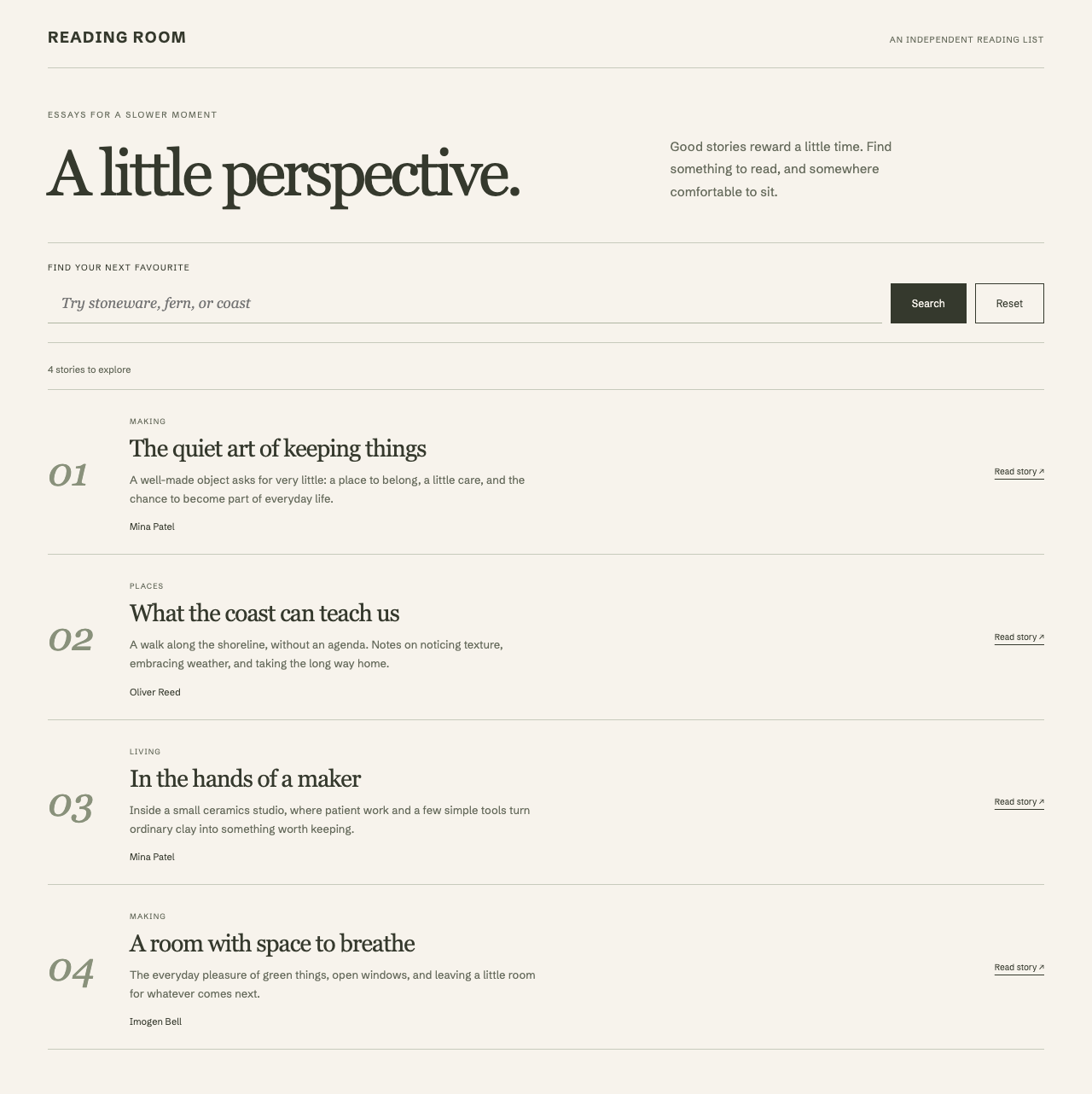
This example adds an independent result list while retaining the built-in Collection below it. It scopes events to the journal-embed wrapper described above. Keep exactly one Collection inside that wrapper, and keep Search enabled in its configuration.
The screenshot shows a separately styled interface using these events. The code below demonstrates the event and safety pattern without that sample CSS; it uses your site's normal HTML styles.
Place the following HTML and script before the wrapped Collection snippet. The script must execute first; do not mark it async or defer it until after the embed. Use unique IDs if you add another example on the page.
<section id="collection-companion" aria-labelledby="companion-title">
  <h2 id="companion-title" tabindex="-1">Explore this selection</h2>
  <form>
    <label for="companion-query">Search this selection</label>
    <input id="companion-query" name="query" type="search" disabled>
    <button type="submit" disabled>Search</button>
  </form>
  <p data-message role="status" aria-live="polite">Waiting for the Collection.</p>
  <ul data-results></ul>
  <details>
    <summary>Inspect the latest result snapshot</summary>
    <pre data-snapshot></pre>
  </details>
</section>
<script>
  (() => {
    const panel = document.getElementById('collection-companion');
    const form = panel.querySelector('form');
    const input = panel.querySelector('input');
    const submit = panel.querySelector('button');
    const list = panel.querySelector('[data-results]');
    const message = panel.querySelector('[data-message]');
    const snapshot = panel.querySelector('[data-snapshot]');
    let root;
    let summary = 'Waiting for the Collection.';
    let status = { loading: false, progress: null, error: null };

    function detailForThisCollection(event) {
      const host = document.getElementById('journal-embed');
      const candidate = event.composedPath().find(node =>
        node instanceof Element &&
        node.matches('[data-collection-root][data-collection-id]')
      );
      const detail = event.detail;
      if (!host || !candidate || !host.contains(candidate) ||
          detail?.version !== 1 ||
          detail.collectionId !== candidate.dataset.collectionId) return;
      root = candidate;
      return detail;
    }

    function httpUrl(value) {
      if (typeof value !== 'string' || !value.trim()) return null;
      try {
        const url = new URL(value, document.baseURI);
        return ['http:', 'https:'].includes(url.protocol) &&
          !url.username && !url.password ? url.href : null;
      } catch {
        return null;
      }
    }

    function excerptText(markup) {
      // Parse in an inert template. Never insert its nodes into the page.
      const template = document.createElement('template');
      template.innerHTML = String(markup ?? '');
      return template.content.textContent ?? '';
    }

    function showStatus() {
      list.setAttribute('aria-busy', String(status.loading));
      message.textContent = status.error || status.progress ||
        (status.loading ? 'Loading results…' : summary);
    }

    document.addEventListener('monocle:collection:change', event => {
      const detail = detailForThisCollection(event);
      if (!detail) return;
      input.disabled = submit.disabled = !detail.config.search.enabled;
      if (document.activeElement !== input) input.value = detail.state.query;
    });

    document.addEventListener('monocle:collection:results', event => {
      const detail = detailForThisCollection(event);
      if (!detail) return;
      const hadResultFocus = list.contains(document.activeElement);
      const fragment = document.createDocumentFragment();
      for (const hit of detail.results?.hits ?? []) {
        const href = httpUrl(hit.url);
        if (!href) continue;
        const item = document.createElement('li');
        const link = document.createElement('a');
        link.href = href;
        link.textContent = hit.title || 'View item';
        const excerpt = document.createElement('p');
        excerpt.textContent = excerptText(hit.context);
        item.append(link, excerpt);
        fragment.append(item);
      }
      list.replaceChildren(fragment);
      if (hadResultFocus) {
        panel.querySelector('h2').focus({ preventScroll: true });
      }
      summary = detail.results === null
        ? 'Results cleared. Check the Collection below.'
        : detail.results.totalHits === 0
          ? 'No matching items. Change the query or filters.'
          : `${detail.results.hits.length} displayed of ${detail.results.totalHits} matches.`;
      snapshot.textContent = JSON.stringify(detail, null, 2);
      showStatus();
    });

    document.addEventListener('monocle:collection:status', event => {
      const detail = detailForThisCollection(event);
      if (!detail) return;
      status = detail;
      showStatus();
    });

    form.addEventListener('submit', event => {
      event.preventDefault();
      if (!root?.isConnected) return;
      root.dispatchEvent(new CustomEvent('monocle:collection:update', {
        detail: { query: input.value }
      }));
    });
  })();
</script>
The excerpt parser discards formatting and returns text only. It never adds the parsed nodes to the document. Titles, messages, and JSON use textContent; URLs must pass the HTTP(S) check. Apply the same URL check to image URLs if you add images. Do not assign event fields to live innerHTML. If you preserve highlight markup, use a reviewed sanitiser with a narrow allow-list instead.
The snapshot panel is for development. Remove it from a public design if visitors do not need it. Keep the event listeners installed once per page. In a single-page application, remove them when the owning view is destroyed, and register fresh listeners before mounting its next embed.
Send state updates
Dispatch monocle:collection:update directly on the root found for that Collection, not on document. Its detail is a partial state object, not an object containing state.
| Requested change | Detail |
|---|---|
| Search | { query: 'sea ice' } |
| Navigate | { page: 2 } |
| Change sort | { sort: 'title_asc' }, if enabled in config.sort.options. |
| Require stock | { onlyInStock: true }, if the stock filter is enabled. |
| Clear group selections | { groups: {} } |
| Select an option | { groups: { [group.id]: [option.id] } }, using IDs from config.groups. |
| Set a price range | { priceMin: '10.50', priceMax: '50', priceCurrency: 'EUR' }, for an enabled EUR price filter. |
| Clear price bounds | { priceMin: '', priceMax: '' } |
| Show all dates | { dateRange: 'all', dateFrom: '', dateTo: '' } |
groups replaces the complete group-selection map. To change just one group while retaining others, copy the latest change-event state.groups, then replace that group's array. An empty array removes that group's selection.
The page defaults to 1 for an update unless you supply it. An empty update therefore resets the page only; it does not clear every filter. To reset a full custom form, send every value you intend to clear and use config.sort.default for the default order.
Use only enabled settings and IDs from the current config. Price bounds need the appropriate currency, and a custom date range needs both valid dates. The embed uses the same validation as URL state: invalid values are normalised, option IDs outside the configured groups are removed, and unknown top-level update keys reject the update. A valid selection can still have zero matches. An update cannot enable a disabled search or filter feature or bypass access rules.
Listen for the resulting change and results events instead of assuming that your requested state was accepted unchanged. Updates use the embed's existing request scheduling; do not issue a second search request from the event handler.
Example: a custom product shortlist
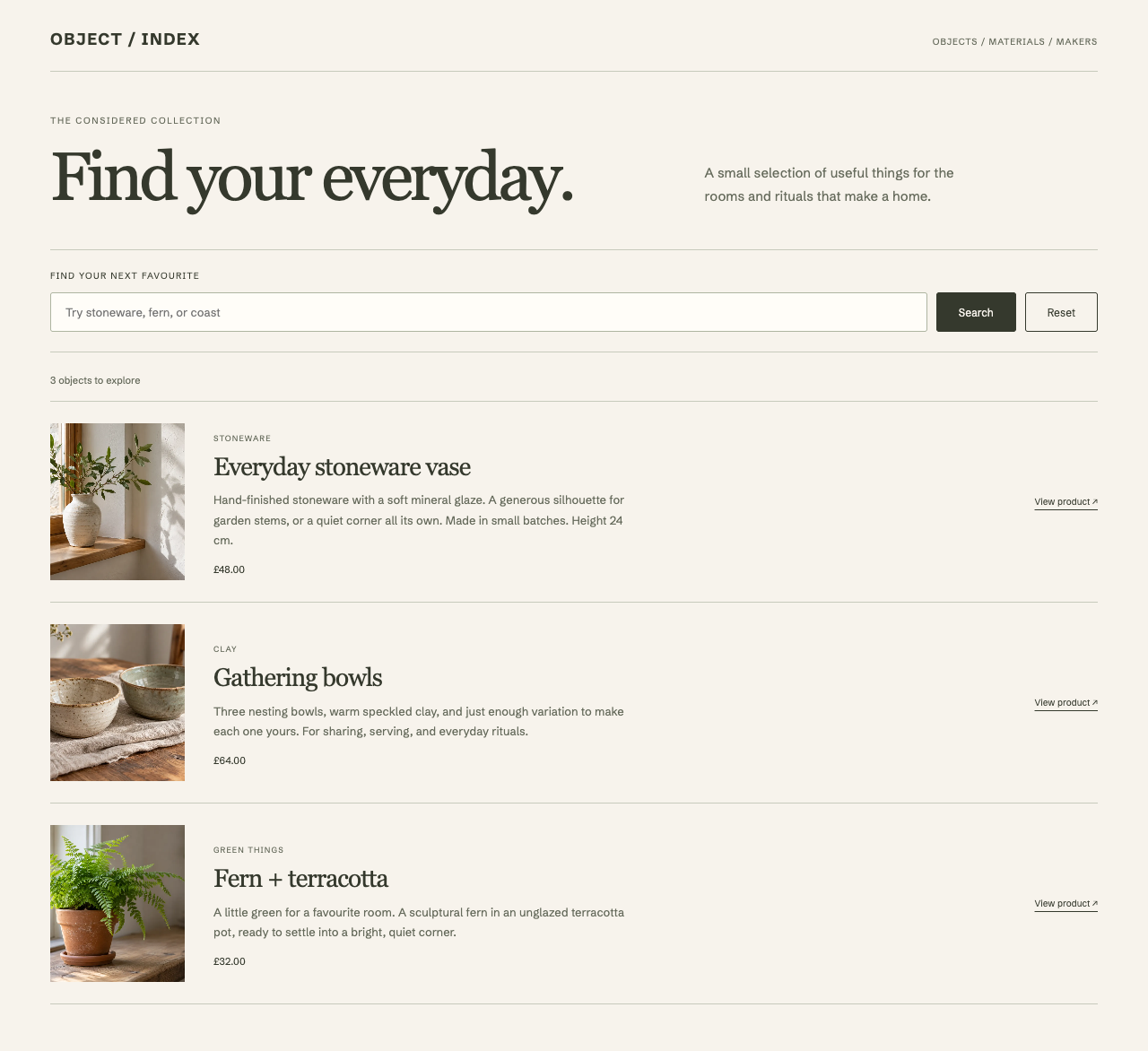
The same event flow can support a product shortlist or comparison layout. Use sourceType === 'product', the price object, image URLs, boost, and filterMatches to choose the presentation. Resolve filter IDs to labels through config.groups.
Keep the distinction between a displayed result and a purchased product. On Squarespace, retain links to the native product pages for options and purchase. Clear the custom output on results: null, handle empty results and errors, and do not keep a private result snapshot after access changes.
Before hiding any built-in output, test keyboard focus, pagination, filters, initial loading, refreshes, and failures. A complete replacement must provide those behaviours, not only attractive cards. The SEO guide explains why meaningful item links must remain available.